The Hardest Feature We Didn't Ship: Engineering the Chat "Lift Effect" in React Native
In mobile app development, sometimes the smallest interactions are the hardest to get right.
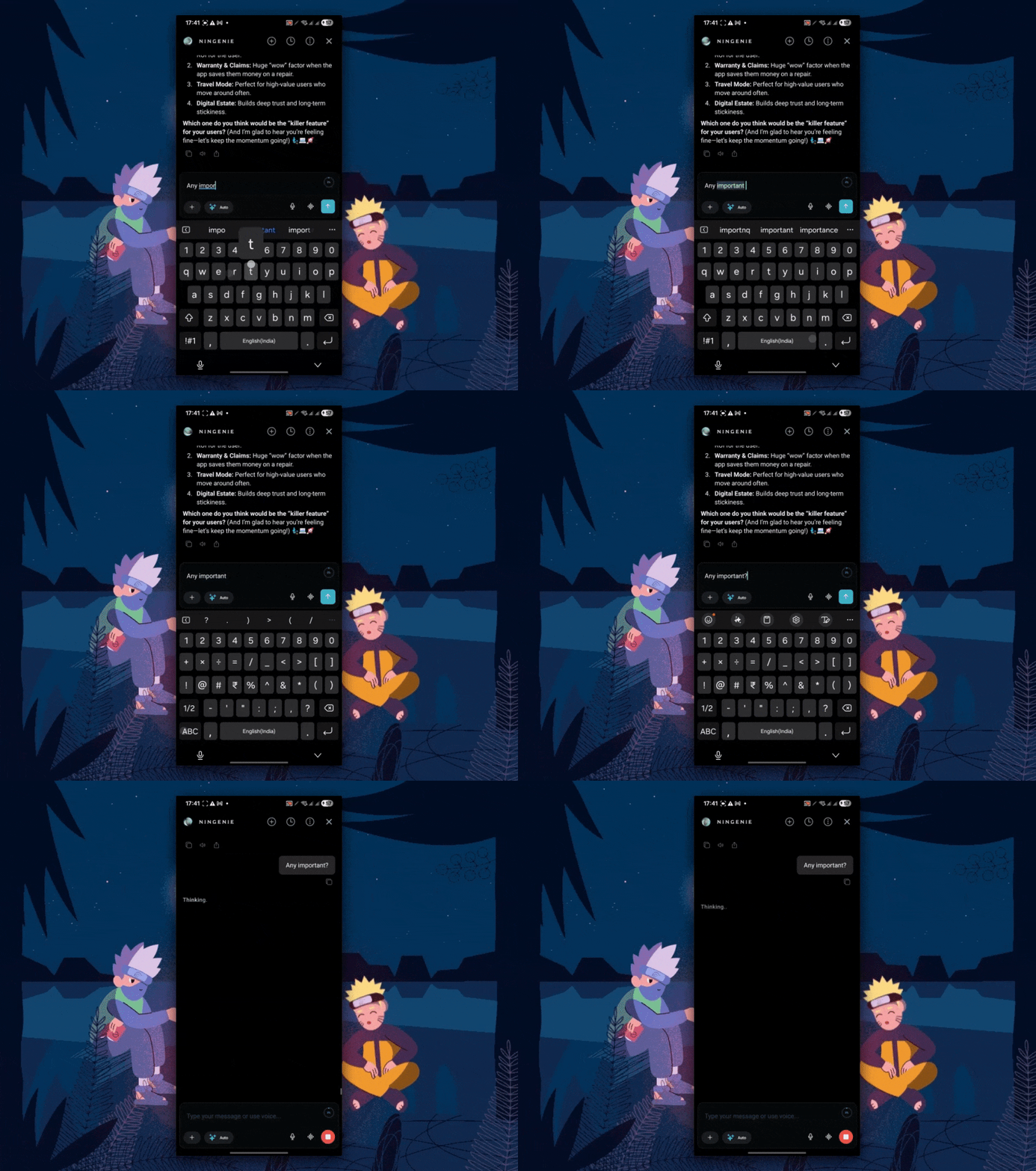
We recently spent a significant amount of engineering time building a "Lift Effect" for our AI chat interface...similar to what you see in the ChatGPT iOS app. The idea is simple: when you send a message, instead of your message just appearing at the bottom, the entire chat "lifts" up to the top of the screen, creating a blank space below. As the AI streams its response, that blank space is filled, keeping your query perfectly positioned at the top.
It sounds like a nice-to-have. But getting it to work smoothly in React Native, at 60fps, without shakes or race conditions, turned out to be our "Final Boss" of chat UI challenges.
Why This Was Harder Than The Rest
We've built some complex UI features in this app. We have faded edge animations on scroll views. We have a robust auto-scroll engine that sticks to the bottom like glue but releases the moment you touch the screen. We have keyboard avoidance that creates a seamless transition when the keyboard flies up. We even have smart logic that decides: "If the user sends a message while in the middle of the chat, scroll down. If they are at the end, just append."
Compared to those, the "Lift Effect" was exponentially harder. Why?
- It fights the physics engine: Auto-scroll and keyboard avoidance work with the natural direction of the list (growing downwards). The Lift Effect works against it. We are trying to force a list to "stay still" at the top while content is being stuffed into it from the bottom.
- It's a visual illusion: We aren't actually lifting the chat. We are instantly injecting a massive blank footer, scrolling to the very end in a single frame, and then mathematically shrinking that footer pixel-by-pixel as the AI text streams in.
- The "Jitter" Tolerance is Zero: With a faded edge or a standard scroll, a 1-pixel jitter is invisible. When you are "lifting" a message to the top and holding it there, a 1-pixel jitter makes the text look like it's vibrating. It creates motion sickness.
The Logic: When Do We Actually Lift?
One of the trickiest parts was deciding when to trigger this effect. It can't happen every time. After weeks of testing, we codified the "Lift Conditions":
- Condition 1: The User Must Be at the Bottom. If I'm reading history 50 messages up and I reply, I don't want to be yanked to the top of the screen. I want to see my message insert below where I am.
- Condition 2: History Must Exist. If it's the very first message in a new chat, a "lift" feels broken. There's nothing to lift away from. The effect only makes sense when there is a "stack" of previous context to push up.
- Condition 3: The AI Must be Ready. We wait for the "streaming" state to kick in. If we lift too early, we stare at a blank screen. If we lift too late, the text has already started appearing and the jump looks glitchy.
We had to build a dedicated state machine just to track these conditions safely:
const shouldLift =
  justStartedSending &&
  userWasAtBottom &&
  containerHeight > 0 &&
  hasPreviousAssistantMessages;
The Implementation Journey
We built this using React Native Reanimated and FlashList. We quickly realized that simple state updates would never be performant enough. We needed to handle everything on the UI thread.
The "Shake" and The Fixes
The biggest technical hurdle was the "Shake". FlashList recycles views. Sometimes, during a rapid stream of tokens, the estimated size of the list would fluctuate slightly before settling.
If we updated our spacer size based on a fluctuating content height, the user's message would vibrate up and down.
The Fix: Monotonic Shrinking
We implemented a strict rule: The blank space can only get smaller. It can never grow back, even if the layout engine reports a temporary height decrease. We tracked the maxContentGrowthRef and ignored any layout updates that reported less growth than our max.
The "Race Condition" Nightmare
The Lift Effect introduced a three-way race condition between:
- The Auto-Scroller: "New text arrived! Scroll to bottom!"
- The Keyboard: "I'm closing! Shift the view down!"
- The Lift Effect: "STAY STILL! I am managing the offset!"
We had to implement a locking mechanism (isInLiftModeRef) that effectively silenced the auto-scroller and keyboard adjustment logic specifically while the lift was active. One slip in this logic meant the chat would wildly jump between the top and bottom of the screen.
Why We Shelved It
After days of polishing, we had it working. It was smooth. It was performant. It looked "premium."
But then we kept using it. And we realized something surprising about user psychology.
The "Bottom-Up" Reading Habit
The Lift Effect assumes the user wants to focus on the top of the screen. But mobile chat interfaces (iMessage, WhatsApp, Telegram) have trained us for a decade to look at the bottom of the screen. That's where our thumbs are. That's where the newest content usually appears.
When the Lift Effect triggers, it forces your eyes to jump from the bottom (where you just typed) to the top (where the message lifted to). Halfway through testing, I realized I hated it. I wanted to read the AI's response as it emerged from the bottom, line by line. I didn't want to chase it up the screen.
Conclusion
We built a technically impressive feature that solved race conditions, layout thrashing, and 60fps animation challenges. But we realized that technical excellence doesn't always equal better UX.
For now, we've disabled the Lift Effect in our production build. We used flash-list and reanimated to push the boundaries of what's possible in React Native, but we also learned that sometimes, the standard behavior exists for a reason: it's what our eyes expect.
Sometimes the best code you write is the code you decide not to ship.

